10 February 2015
The New Gaslight AV Setup: Recording Videos and Podcasts

by Kevin Rockwood
One of the coolest things we do at the office is host Meetup groups. There’s a
ton of talented developers in Cincinnati, and we love it when they come by our office show off
the stuff they’ve been working on. But while Meetups are great, they’re only
helpful to the people that show up.
That’s why we decided to record our Meetups
and post all of them on the Gaslight Youtube Channel.
We’ve gone through many iterations with our recording setup. I’d like show you what
we use to shoot these videos, the challenges we’ve faced, and how we plan to
make them even better.
The Current Setup

The heart of our studio is a Mac Mini running Telestream’s WireCast
software. Wirecast essentially replaces a hardware video switcher like those
found in broadcast TV studios. It allows us to switch between multiple video
sources, usually a video camera and a computer screen, and records files
that are ready for YouTube. Wirecast can also live stream directly to YouTube,
which we do on occasion.
For audio, we have a wireless lapel mic for the presenter and a room mic for
audience questions. The mics feed into a Mackie Onyx 1220i which doubles as the
mixer for the Gaslight Podcast.
The nice thing about the 1220i is that it has a built in analog to digital converter,
so we can plug it directly into the Mac Mini via a FirWwire cable.
One of the biggest challenges we’ve faced is recording the presenters computer
screen. It turns out to be rather difficult to drive both a projector screen
and video feed for recording. Wirecast comes with a free program called
Desktop Presenter.
We install it on the presenter’s computer, and it sends their screen to
Wirecast over the network.
While Desktop presenter works well, we’ve found some problems. It’s
cumbersome to get installed and configured, especially when we have more
than one presenter at a time. It’s also prone to latency issues and dropouts. We
also can’t record the output of the Apple TV.
The New Setup
As part of our move to downtown, we’re planning to upgrade the current
recording setup with something that’s more robust and easier to setup. Our
ultimate goal is to have anyone walk into the presentation space and hit the
record button without needing to install or configure anything. We also want to
be able to record the Apple TV output.
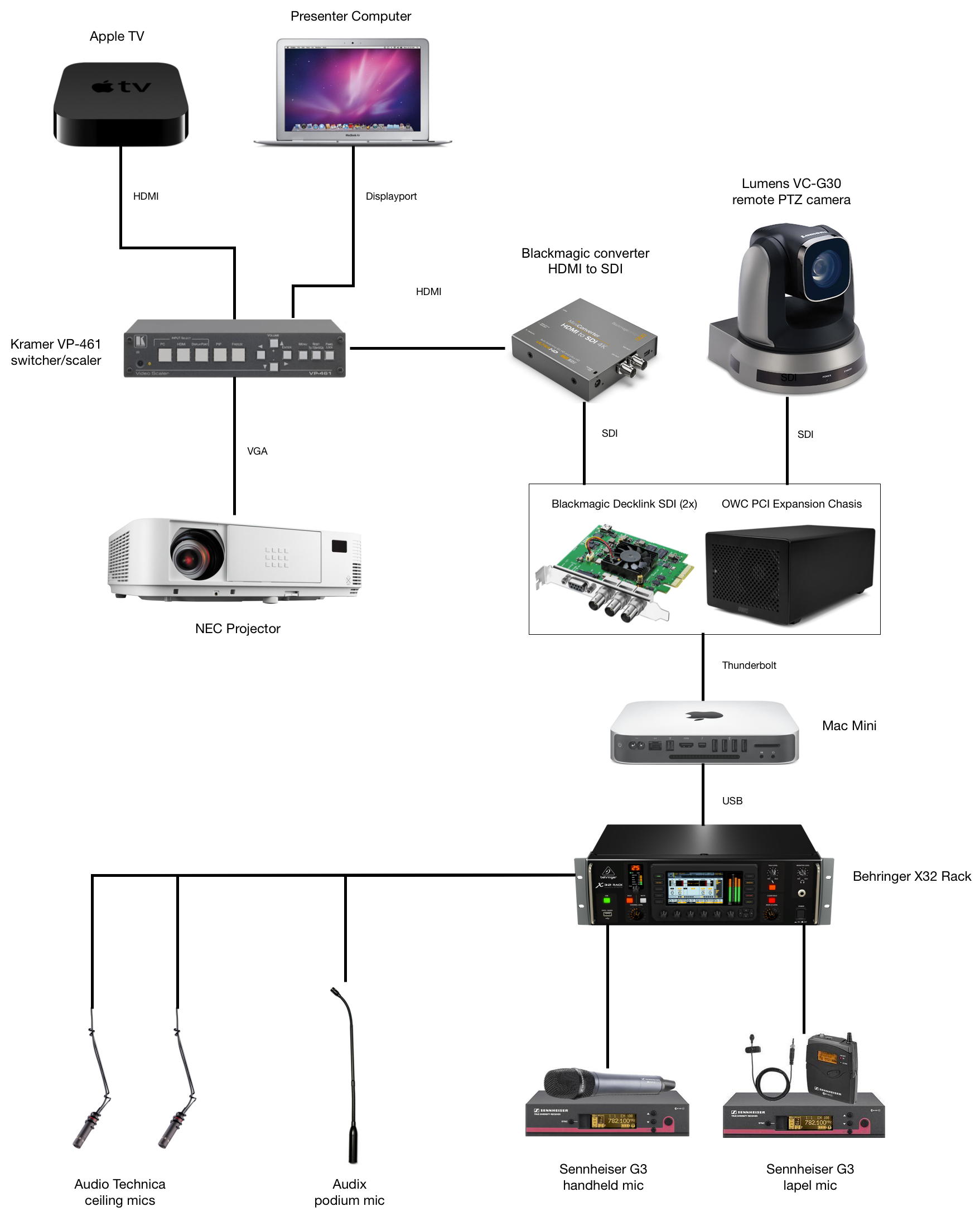
In this setup, we’ll continue using the Mac Mini with Wirecast, but we’re
removing Desktop Presenter in favor of a hard-wired feed. We’re using SDI in
places where long cable runs are necessary - HDMI gets very unreliable with
cables longer then 20 feet.
We’re increasing the audio capabilities by adding
additional microphones, and the X32 will automate the mixing process making the
system a little more hands-off. Adding the Kramer scaler ensures that we
maintain 1080p resolution regardless of the input and because we capture the
output from the scaler, we can record the Apple TV or any other input device.
In addition to what’s on the diagram, we’re also adding a pair of QSC speakers
and an amp for sound reinforcement.
This new setup will give us higher quality videos that are easier to produce.
I’m really excited to see what new things we’ll be able to do with this gear.
Stay tuned and let us know if you have any questions or suggestions!